Start here
For this 77×39 sheet, use 16×16 frames, a 2px outside margin and 3px spacing. Pass those values to this.load.spritesheet, then animate frame numbers 0–7. The first source rectangle is (2,2,16,16); the last is (59,21,16,16).
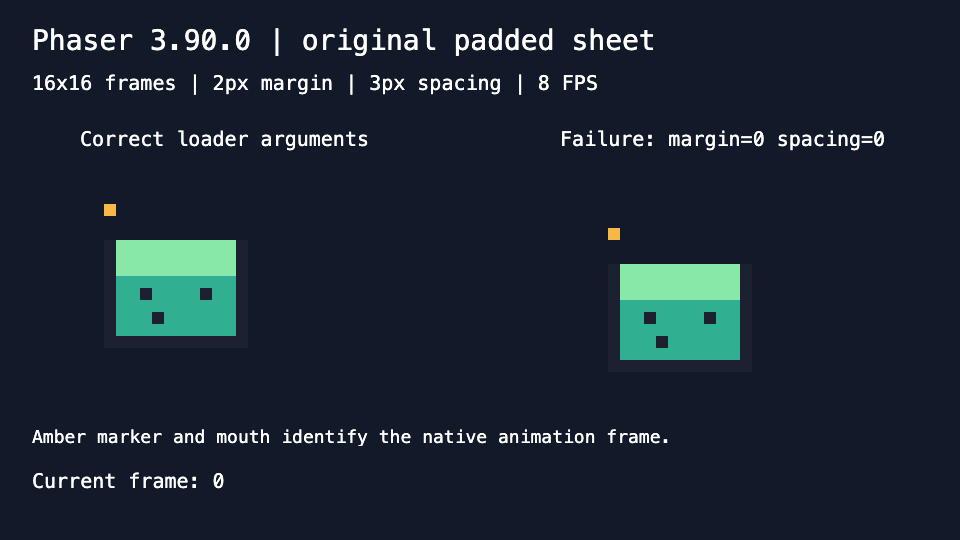
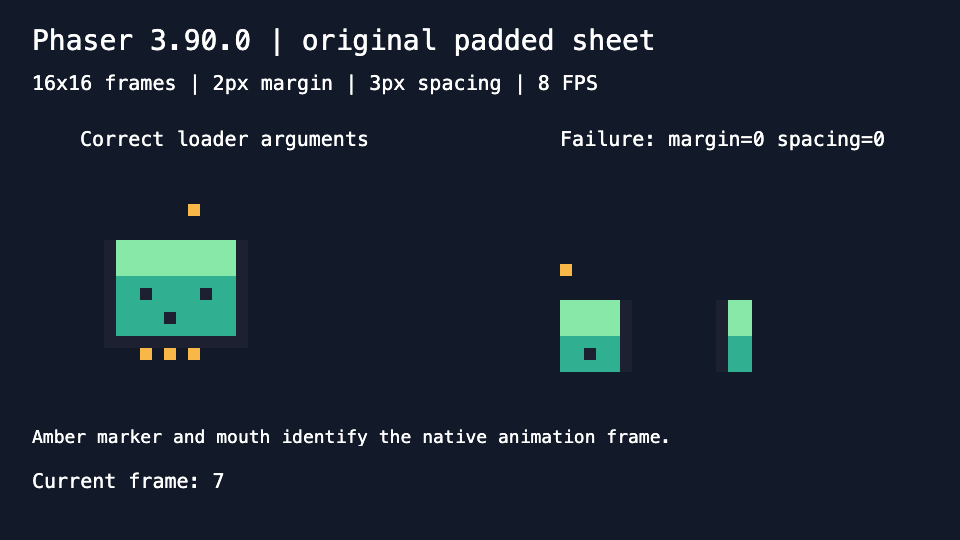
The original cells appear intact and in order through Phaser’s loader and animation system. The same PNG loaded with zero margin and spacing visibly shifts and splits the artwork.
What you need
Use the original CC0 PNG below and the downloadable project. The ZIP contains the PNG, source, package lockfile, README and licenses; it requires Node 24+, npm ci --ignore-scripts and a localhost server. Phaser is installed from npm when you run that command.
Download the original 77×39 PNG · Inspect its geometry sidecar

Tested with: Phaser 3.90.0, Canvas renderer; Chromium 154.0.8037.44 on macOS at DPR 1; Node 24.22.0; independent Pillow 12.3.0 inspection.
1. Install and serve the extracted project
Extract the ZIP, enter its phaser-sheet directory, and run:
npm ci --ignore-scripts
npm start
Open http://127.0.0.1:8176. The page runs Phaser from the installed local package. Opening index.html directly as a file will not run this loader example. If the port is occupied, set PHASER_EXAMPLE_PORT before starting the server.
The project uses the exact Phaser 3.90.0 version and a lockfile. It needs no account or paid software. Dependency caches are excluded from the ZIP.
2. Check the margins and complete cells
For column c and row r, use x = 2 + c × 19 and y = 2 + r × 19. Each stride is 16px of content plus a 3px gap. The outside margin belongs around the sheet, while spacing belongs between neighboring cells.
The width is 2 + 4×16 + 3×3 + 2 = 77; the height is 2 + 2×16 + 3 + 2 = 39. Check both outer edges before accepting a grid. This project uses known regular cells and does not detect irregular artwork automatically.
3. Pass the geometry to Phaser’s actual loader
In the scene’s preload(), load the PNG with explicit frame dimensions and inclusive frame numbers:
this.load.spritesheet("correct", "assets/padded-sheet.png", {
  frameWidth: 16, frameHeight: 16,
  margin: 2, spacing: 3,
  startFrame: 0, endFrame: 7
});
The project displays the actual frame rectangles returned by Phaser. Frame 0 must start at (2,2), and frame 7 at (59,21), with width and height 16 in both cases.
manifest.json is a generic inspection sidecar. Phaser does not consume it automatically as an atlas file. The loader arguments above control slicing; a PNG supplies no original FPS, animation tags or pivots.
4. Create and inspect the native animation
this.anims.create({
  key: "correct-loop",
  frames: this.anims.generateFrameNumbers("correct", { start: 0, end: 7 }),
  frameRate: 8, repeat: -1
});
this.add.sprite(80, 180, "correct", 0)
  .setOrigin(0).setScale(12).play("correct-loop");
Watch the amber marker, mouth and bottom marks, then pause playback to inspect a pose. The recorded native animation-update events followed 1,2,3,4,5,6,7,0 three times, with frame 0 also captured initially. Native pause/resume was checked separately.
The visible result is Phaser’s game canvas. All eight 192×192 rendered sprite rectangles matched exact 12× copies of their original 16×16 cells in the tested configuration.
5. Compare the wrong loader settings
The right sprite loads the same PNG with margin: 0, spacing: 0. Phaser then returns (0,0,16,16) for frame 0 and (48,16,16,16) for frame 7. The first pose shifts; the last includes separated pieces of neighboring artwork. Fix the declared crop geometry before changing timing or image size.
6. Keep the tested Canvas settings explicit
new Phaser.Game({
  type: Phaser.CANVAS, width: 960, height: 540,
  pixelArt: false, roundPixels: false, antialias: false,
  audio: { noAudio: true }, scene: SheetScene
});
This example uses integer sprite positions and 12× scale. In Phaser 3.90.0, the pixelArt preset forces rounding on; its Canvas renderer adds 0.5 to destination frame width/height before scaling. The initial preset run therefore spanned 198px instead of 192px and failed exact cell equality. The explicit settings above passed all eight comparisons.
Keep that observation scoped to this pinned Canvas path. It does not establish the same behavior for every WebGL renderer, camera, zoom or display scale.
7. Distinguish configured FPS from measured delivery
The animation is configured for 8 FPS. In the instrumented startup trace, 23 update intervals covered about 4.80 seconds: roughly 4.79 updates per second. The trace includes startup and capture work. Frame order and rendered pixels passed; this measurement does not promise real-time 8 FPS delivery or general performance.
The example verifies loader geometry and one native animation path. It does not establish automatic atlas segmentation, engine-native JSON export, moving-camera behavior or arbitrary source-file color fidelity.