★ NEW · NO SIGN-UP
Pixel art & sprites.
Zero blur.
Enlarge pixel art and sprite sheets 2×, 4× or 8× with exact nearest-neighbor scaling. Free, with no account or upload: your image stays in your browser.
▶ TRY IT NOW
or drop it here, or paste with Ctrl/⌘ + V
PNG, JPEG, WebP or GIF · up to 10 MB · never uploaded
Export .aseprite files as PNG first. GIF input uses its first frame only; the download is a static PNG.
Original CC0 sprite sheet · 64×32 px · 16×16 px frames.
Try a real sprite sheet
One original transparent sheet, eight frames in a 4 × 2 grid. These are actual PNG files generated from the same pixels, using the tool's nearest-neighbor scaler and a separate bilinear resampler. The images are enlarged here for inspection.

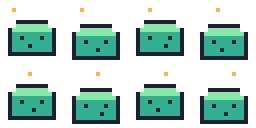

Open the Sprite Sheet Upscaler, upload the original, and choose 4× to reproduce the result. The Godot project compares native and enlarged frames with Nearest and Linear filtering. Native Nearest filtering may already solve your task without enlarging the file. Fixtures and example project: CC0. This demonstrates pixel copying, not recovery of an already blurred image.
🎮 GAME ENGINE PRESETS & GUIDES
ROADMAP IDEAS
These previews are unavailable. No release date is confirmed.
? QUESTIONS
- How do I upscale pixel art without blurring?
- QuickUpscale copies every source pixel into an exact 2×2, 4×4 or 8×8 block (nearest-neighbor), so hard edges and flat colors stay perfectly sharp. No smoothing or interpolation is applied.
- Are my images uploaded to a server?
- No. Pixel Art upscaling runs entirely in your browser. Your image never leaves your device.
- Is the pixel art upscaler free?
- Yes. Pixel Art upscaling is free with no account and no daily limit, because it runs on your own device.