Start here
Give the element the size of one displayed frame, use the strip as a non-repeating background, and animate one full strip width with steps(8, end). For eight 16 px frames displayed at 4×, that means a 64 px viewport, 512 px background and −512 px terminal offset.
A working eight-frame HTML/CSS loop, scheduled at 100 ms per frame, with a pause control and a static first frame when reduced motion is enabled.
What you need
One horizontal 128 × 16 PNG contains eight equal 16 × 16 cells, with no gaps or margins. The original CC0 project includes the strip, HTML, CSS and license; it runs by opening the extracted index.html.
Tested with: Chromium 154.0.8037.44 on macOS, device-pixel ratio 1. First/last frames, loop boundary, pause/resume and reduced motion were executed and inspected.
1. Measure the strip and displayed frame
- Download the project and keep its
assetsfolder besideindex.htmlandstyle.css, or open the runnable browser example. - Inspect the original 128 × 16 strip. Read its eight frames from left to right; the amber marker moves to a different column in each frame.
- Choose the display scale. At 4×, one 16 px cell becomes 64 px and the full strip becomes
8 × 64 = 512px wide.

2. Move a full strip width in eight end steps
Create the sprite element in index.html:
<div class="sprite" role="img" aria-label="Animated green character"></div>Put this in style.css. The relative PNG path matches the downloaded project:
.sprite {
  width: 64px;
  height: 64px;
  background: url("assets/sprite-strip.png") 0 0 / 512px 64px no-repeat;
  image-rendering: pixelated;
  animation: strip 800ms steps(8, end) infinite;
}
@keyframes strip {
  to { background-position-x: -512px; }
}
With an infinite loop and end steps, the visible x positions are 0, −64, −128, −192, −256, −320, −384, −448 px. The terminal −512 px is one whole strip width; the next iteration returns to the first frame.
Keep frame size, background size and offsets in the same displayed coordinate system. The image-rendering setting controls enlargement edges; it does not supply frame timing or repair incorrect cell geometry.
3. Inspect the last frame and loop boundary
Watch the amber marker advance through all eight cells in the runnable example. Use its pause control to inspect the pose. With reduced motion off, you can also seek the actual animation from the browser console:
const sprite = document.querySelector("#correct");
const animation = sprite.getAnimations()[0];
animation.pause();
animation.currentTime = 799;
getComputedStyle(sprite).backgroundPositionX; // "-448px"
animation.currentTime = 800;
getComputedStyle(sprite).backgroundPositionX; // "0px"These static crops show the first and final cells of the original PNG. In the executed browser run, 799 ms showed the final cell, 800 ms returned to the first, and the rendered first/loop crops were identical. The second loop also returned from −448 px at 1599 ms to 0 px at 1600 ms.
The 800 ms cycle schedules each frame for 100 ms, or 10 frames per second. Browser scheduling and display refresh affect presentation. In this browser, exact seeks to 300, 600 and 700 ms returned the preceding frame; seeking 0.001 ms later returned the next. Use this as animation timing rather than a frame-accurate media clock.
4. Add pause and respect reduced motion
Wrap the sprite with a labeled checkbox and container:
<input id="pause" type="checkbox">
<label for="pause">Pause animation</label>
<div class="previews">
  <div class="sprite" role="img" aria-label="Green character"></div>
</div>
Add the following CSS after the animation rules:
#pause:checked ~ .previews .sprite {
  animation-play-state: paused;
}
@media (prefers-reduced-motion: reduce) {
  .sprite {
    animation: none;
    background-position: 0 0;
  }
}
Check the box to pause, then uncheck it to resume. Enable prefers-reduced-motion: reduce in browser developer tools, or use your system preference: the example displays the first frame without animation. The pause checkbox does not override that preference. Both behaviors were checked in the runnable project.
5. Recognize a mismatched step count
The second preview intentionally uses steps(7, end) with the same eight-cell strip and −512 px endpoint. Each jump is about 73.14 px. At 400 ms the measured x position was −219.429 px, between cells, and the character was visibly sliced across adjacent frames. Restore eight steps.
Inspect the recorded 400 ms browser result
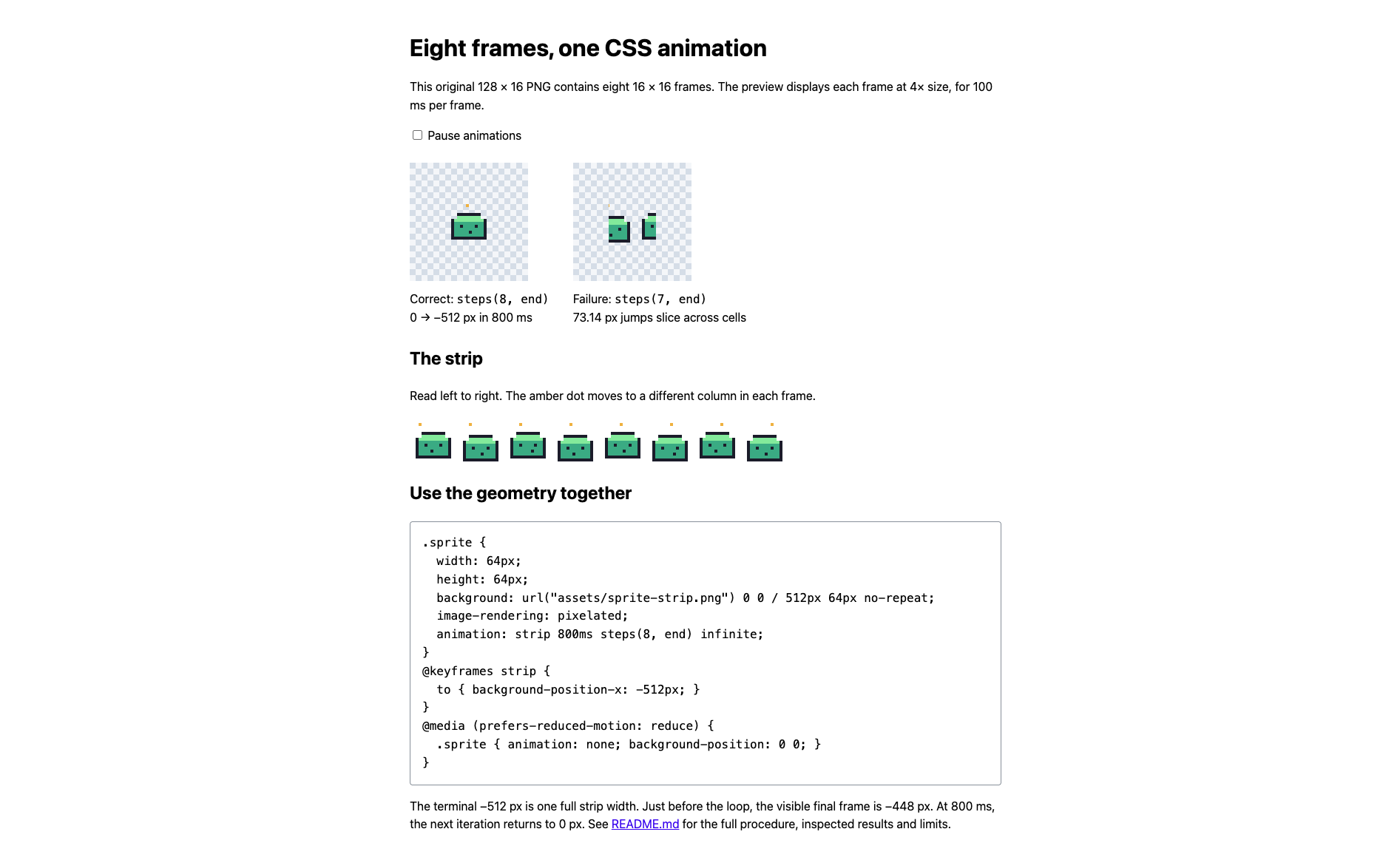
Actual Chromium capture of the downloadable project. The two previews share the same strip and terminal offset.
Another geometry mistake is combining eight steps with a −448 px endpoint. That creates 56 px jumps, which also fail to match 64 px cells. The full-width endpoint and the number of cells belong together.
This example assumes one gap-free row and equal frame durations. Multi-row sheets, gutters, rotated atlas cells and unequal per-frame delays need different coordinates or playback data. A plain PNG does not contain those timing instructions.