Start here
Select your static PNGs in the batch PNG upscaler, choose 2×, 4× or 8×, then choose Upscale selected PNGs. Inspect the success and failure counts before downloading the individual PNGs or ZIP. The manifest records which source produced each output.
Enlarge three differently sized original images in one run, retain named outputs and their mapping, and handle invalid inputs or cancellation without treating a partial batch as complete.
What you need
You have several static PNG assets to enlarge by the same integer factor. The original CC0 input pack supplies a 12×12 beacon, an 18×10 comet and a 10×14 alpha-boundary robot, plus separate invalid and cancellation cases. Extract the ZIP before selecting the PNGs; this tool does not accept uploaded ZIP archives.
Tested with: Desktop Chromium 154, local OpenNext/Cloudflare workerd preview built with Node 24.22.0. Actual exports independently decoded with Pillow 12.3.0; layout checked at emulated 360/1280 CSS-pixel viewports.
1. Select the three original PNGs
- Extract the input pack and find
inputs/beacon.png,inputs/comet.pngandinputs/alpha-boundary.png. - Open the batch PNG upscaler. Choose Choose PNG files and select those three files together, or drop the selection into the tool.
- Check the selected-name list. Keep the larger
cases/cancel-grid.pngout of this first run.
These are three independent images with different dimensions. They are not cells of a sheet, and the batch operation does not infer or change sprite-grid layout.
The tool admits up to 32 files and 64 MiB across the selected files. Empty files and candidates over 10 MiB receive per-file failures; valid peers can continue. Too many files, invalid names or combined-size violations reject the whole selection before processing.
2. Choose an explicit integer scale and run
Choose 2× for the first run, then choose Upscale selected PNGs. A factor applies to width and height: 2× means four times as many pixels. The 4× and 8× choices create sixteen and sixty-four times as many pixels.
| Input | Source | 2× | 4× | 8× |
|---|---|---|---|---|
| beacon.png | 12×12 | 24×24 | 48×48 | 96×96 |
| comet.png | 18×10 | 36×20 | 72×40 | 144×80 |
| alpha-boundary.png | 10×14 | 20×28 | 40×56 | 80×112 |
The recorded browser runs produced all nine dimensions in this table. Every PNG was downloaded through the actual tool and independently decoded. Both opaque inputs match exact repetition of their original RGBA; the transparency example has a separate codec boundary described below.
The geometry ceilings are 16,777,216 source/output pixels and 16,384 pixels per edge. A separate estimated live-memory policy can reject a smaller image or a later batch item. A small compressed PNG does not establish that its decoded or enlarged image fits, and these limits do not guarantee a safe budget on every mobile device.
For a reported limit failure, choose a lower factor or reduce the selection, run again and inspect each outcome.
3. Inspect outcomes, named files and the result manifest
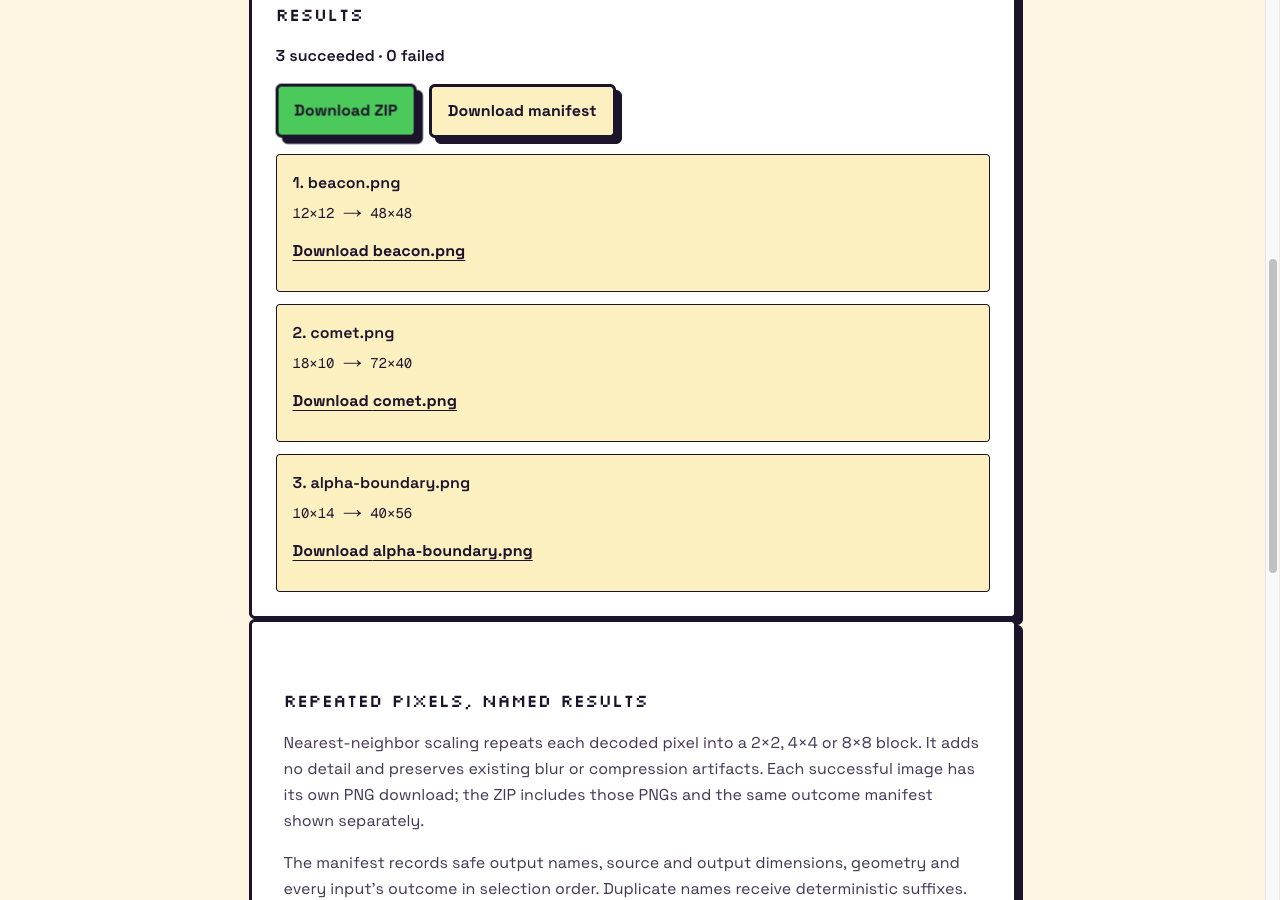
- Read the succeeded and failed counts, then check each listed source. A successful row supplies source/output dimensions and its named PNG download.
- Choose Download ZIP to collect successful PNGs and their result
manifest.json, or download each PNG separately. - Choose Download manifest to inspect
outcomes,sources,outputsand orderedframes. Source and output indices describe the mapping even when an earlier input failed. - Open the downloaded PNGs in an image editor and verify the dimensions against the table. Download what you need before clearing or replacing the selection, which removes the previous result links.
Frame rectangles use a top-left origin and integer pixels. A rectangle with x=0, y=0, width=24 and height=24 covers columns 0–23 and rows 0–23. This generic JSON sidecar supplies geometry and outcomes; static PNGs do not provide recovered animation timing, tags or pivots.
The input pack also contains a manifest.json. That file describes the original fixtures and their decoded-pixel hashes. Keep it separate from the manifest produced by your upscale run.
4. Check mixed failures and zero-success behavior
Drop cases/not-a-png.txt together with the three valid PNGs. A PNG-only file dialog may hide the text case; use the drop area for this check. The text bytes should receive a visible invalid-PNG outcome while the valid files continue. The successful PNGs belong in the result ZIP, and the manifest must retain the failed input's outcome.
Next, select only the invalid case and run again. Zero successes means no PNG download and no ZIP download. The outcome manifest remains available to explain the failure. A file extension or MIME label alone does not make bytes a valid static PNG; animated PNGs are rejected rather than silently reduced to one frame.
A worker/capability error or an archive-construction failure is a job error. Treat the error as an incomplete run and keep your originals; do not infer a complete archive from an earlier progress count.
5. Preserve mapping when names collide or work is cancelled
Output paths are generated safe basenames. Names are normalized, Windows reserved-device names are protected, and case/Unicode-equivalent collisions receive suffixes. For example, a selection ordered as hero.png then HERO.PNG uses distinct generated names such as hero.png and HERO-2.png. Use the manifest and outcome rows to check the source-to-output mapping.
The supplied input ZIP contains distinct safe names. Separate browser runs verified canonical/case-equivalent collisions, protected device names and a fresh suffix set after other jobs. Always inspect the generated names and source indices before importing the outputs.
- For a larger cancellation attempt, choose only
cases/cancel-grid.png, select 2× and start the run. - Choose Cancel while processing is active. If the run finished before the click, repeat it; completion before a click does not demonstrate interruption.
- Choose the small beacon again and run at 2×. Confirm that a fresh job completes and the cancelled job supplies no late download links.
The optional grid is 1024×1024; its prospective 2× output is 2048×2048. The recorded check cancelled only after the actual processing worker started, observed worker termination and then completed a fresh small-image run. This is a cancellation check, not a timing or memory promise for your device.
6. Keep the original file and the browser codec boundary explicit
The alpha-boundary robot has 50 opaque pixels, four partial-alpha pixels and 86 fully transparent pixels. Two transparent pixels contain nonzero hidden RGB. At source coordinate (0,0), the file stores (100,150,200,0); it is still invisible in ordinary compositing.
Nearest-neighbor scaling replicates decoded pixels. The recorded export changed (100,150,200,0) to (0,0,0,0), (76,139,201,85) to (75,138,201,85), and (123,45,67,1) to (0,0,0,1). These are measured browser codec differences, not changes to the original files.
Every exported block matched repetition of separately measured browser canvas readback. Alpha matched the original at all three factors. Relative to repeating original-file RGBA, 40, 160 and 640 channel bytes differed at 2×, 4× and 8×; composites over black and white still matched this original fixture exactly. Preserve the original when hidden RGB, profiles or exact file RGBA matter. These observations do not promise the same rounding for every browser or PNG.
For a separate executed example of that boundary, see the PNG/JPEG export comparison. If a visible halo is already in the source, use the transparent-edge diagnosis before enlarging it.