Start here
For the supplied 74 × 38 PNG, use Tile Width 16, Tile Height 16, Margin 2 and Spacing 2. Margin skips the outside border; spacing skips the gap between neighboring tiles. The content cell stays 16 × 16. Check that local IDs 0 and 7 contain the complete first and last numbered tiles.
An external TSX tileset with eight correctly cropped tiles, a 4 × 2 TMX map that preserves their order, and a native failure comparison showing what zero margin and spacing do to this image.
What you need
Use the original CC0 74 × 38 padded PNG or extract the project ZIP. It contains eight numbered 16 × 16 tiles in four columns and two rows. Magenta marks the 2 px outside border and 2 px gaps. The ZIP already includes the PNGs; no generator is required to open it in Tiled.

Tested with: Tiled 1.12.2, Qt 6.10.2, macOS arm64; native TSX/TMX readers and bundled TmxRasterizer 1.0. Native reader reopening and actual map rendering were verified; editor dialog interaction was not recorded.
1. Open the original project and inspect its settings
- Extract the ZIP, open
tiled-import/padded.tiled-projectin your installed Tiled, then openpadded-map.tmx. - Open the external
padded.tsxfor editing. Inspect its image settings: width 16, height 16, margin 2 and spacing 2. - Check all eight digits, starting with 0 at the top left and ending with 7 at the bottom right.
To reconstruct the import yourself, create a new tileset based on the supplied PNG, enter those four values, and save an external TSX file. These are reproduction instructions. The recorded acceptance used Tiled's native readers to load and reread the supplied files; it did not exercise the import dialog.
| Setting | Value | Meaning |
|---|---|---|
| Tile width / height | 16 / 16 px | Artwork inside each cell |
| Margin | 2 px | Outside border before the first cell |
| Spacing | 2 px | Gap between adjacent cells |
| Columns / tiles | 4 / 8 | Four columns and two rows |
The width is 2 × 2 + 4 × 16 + 3 × 2 = 74; the height is 2 × 2 + 2 × 16 + 1 × 2 = 38. A padded image need not be divisible by its content cell size.
2. Verify both ends and distinguish local from global IDs
Using top-left-origin source pixels, the first crop is (x=2, y=2, width=16, height=16); the last is (56, 20, 16, 16). The next column advances by 16 + 2 = 18 pixels. Checking only the first tile can miss a spacing error that accumulates across the row.
The reopened native tileset returned first local ID 0, last local ID 7, and map order 0, 1, 2, 3, 4, 5, 6, 7. Verify the complete digits and their dark borders.
The map stores firstgid=1, so its CSV contains global IDs 1–8 for local IDs 0–7. Global ID 0 means an empty map cell. This map has one tileset and no flip flags; other maps need documented flag handling and tileset lookup before converting IDs.
<tileset tilewidth="16" tileheight="16"
         spacing="2" margin="2" tilecount="8" columns="4">
  <image source="assets/padded-tiles.png" width="74" height="38"/>
</tileset>
Keep TSX, TMX and PNG at their supplied relative paths. If the image is missing after moving the project, restore that relationship before changing crop settings.
3. Render the complete sequence
The supplied map places each local tile once in row-major order. The actual native 1× render is 64 × 32; the 4× render with smoothing disabled is 256 × 128. Independent decoding matched every RGBA pixel to the original expected tiles.
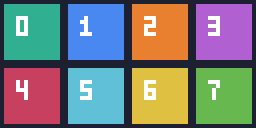
From the extracted tiled-import directory, run the following with your installed renderer's path. In the tested macOS bundle it is beside Tiled.
tmxrasterizer --no-smoothing --scale 4 padded-map.tmx /absolute/output/map.pngThe ZIP also includes native verify.js and optional verify.py. Opening the included project requires Tiled; Python and Pillow are only needed for optional verification. The helper requires a fresh report with the current run ID because Tiled 1.12.2 can exit 0 after a script exception. Exit status or an old report alone is insufficient.
Download the native 1× render or the independently generated expected original map to inspect their pixels.


4. Diagnose shifted crops with the zero-setting counterexample
Open or render wrong-settings-map.tmx. It uses the same PNG with margin and spacing both zero. Its first crop starts in the magenta border; subsequent crops advance by 16 px instead of 18 px.

Restore margin 2 and spacing 2 while keeping content size 16 × 16. Recheck local IDs 0 and 7 and render the sequence again. Increasing content size to include the gap changes what each tile contains.
These diagnostic gaps contain magenta, not duplicated edge pixels. This example establishes the supplied padded image's crop settings. It does not test extrusion, column reflow, or seams caused by a separate engine's filtering, camera or atlas settings. For soft enlargement, check integer nearest-neighbor scaling separately from the crop.