Start here
Re-export the image and metadata from the same Aseprite source at the new size, then load that matching pair in Phaser. Enlarging only the PNG leaves the old crops, trim offsets and logical sizes pointing at different pixels.
A native 2× PNG/JSON re-export renders all six original frames correctly in the example. The 2× PNG paired with the old 1× JSON visibly breaks every frame.
What you need
The project contains an original editable ASE with six 16×12 frames and different visible bounds. It includes native-verified 1× and 2× PNG/JSON references, source, a package lockfile and notices; its local consumer can run without installing Aseprite.
Original editable ASE · 32×16 atlas PNG · 1× JSON · 64×32 atlas PNG · 2× JSON


Tested with: Aseprite 1.1.7-dev GPLv2 source build, Linux ARM64 / Ubuntu 22.04 / Xvfb; Phaser 3.90.0 Canvas, eventemitter3 5.0.1; Chrome UA 154.0.0.0 on MacIntel; Node 24.22.0 and independent Pillow 12.3.0 inspection. CLI export, not native GUI editing.
1. Re-export both files at the new size
Extract the ZIP and enter aseprite-phaser. In an environment where your authorized native runtime works, run the included wrapper:
ASEPRITE_BIN=/path/to/aseprite bash export-native.sh assets/original.ase runs/nativeThe output directory must be new. The wrapper separately reloads the source for the 1× and 2× exports. The 2× command uses this shell excerpt:
common=(--batch --list-tags "$input" --trim --sheet-type packed \
  --filename-format '{frame}' --format json-array)
"$native_bin" "${common[@]}" --scale 2 --sheet atlas-2x.png --data atlas-2x.json
Inside the wrapper, $input is the resolved source, $native_bin is your supplied executable, and the working directory is the new runs/native destination.
To inspect fresh exports in the demo, copy all four atlas PNG/JSON outputs to their corresponding assets/ paths. Keep each same-size pair together. The localhost server does not serve arbitrary runs/ files.
2. Inspect packed crops, trim offsets and logical size
The observed native atlas sizes were 32×16 at 1× and 64×32 at 2×. For frame 0, the native fields were:
| Field | 1× | 2× |
|---|---|---|
| Packed frame (x,y,w,h) | (8,6,5,7) | (16,12,10,14) |
| spriteSourceSize (x,y,w,h) | (2,2,5,7) | (4,4,10,14) |
| Logical sourceSize | 16×12 | 32×24 |
All six native crops were independently restored at their trim offsets and matched the original full logical frames at the intended scale. Phaser’s array-atlas parser consumes these distinct crop, trim and logical-size fields.
3. Compare stale and matching metadata in Phaser
The example deliberately loads both combinations:
this.load.atlas("stale", "assets/atlas-2x.png", "assets/atlas-1x.json");
this.load.atlas("scaled", "assets/atlas-2x.png", "assets/atlas-2x.json");
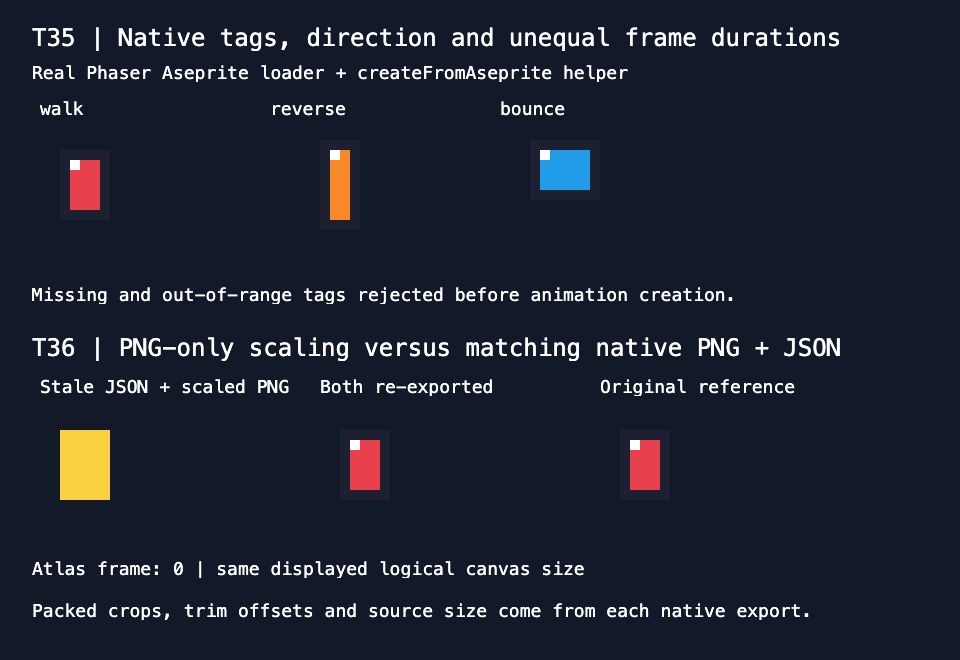
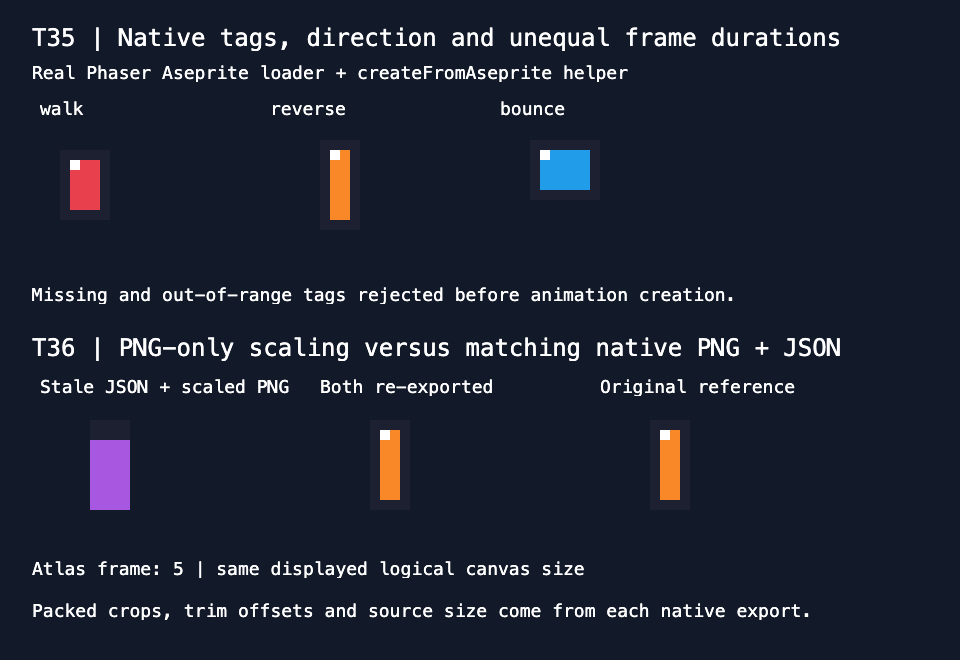
Its original and stale sprites use display scale 10. The matching 2× sprite uses scale 5, so each comparison covers a 160×120 logical display area in the executed game canvas. This keeps display magnification from hiding whether the underlying atlas pair is correct.
With Node 24+ in the extracted directory, run:
npm ci --ignore-scripts
npm test
npm start
Open http://127.0.0.1:8178 and choose Inspect next atlas frame to inspect every bottom-row comparison. Left is stale JSON; middle is the matching re-export; right is the original reference. If needed, set ASEPRITE_PHASER_PORT before starting the server.
Phaser runs from the exact local package/lockfile, with no CDN. Opening the HTML directly as a file does not run this loader project. Canvas uses pixelArt: false, roundPixels: false, antialias: false and integer positions/scales. These explicit settings matter for this version’s destination rounding.
4. Recognize the wrong crop caused by stale JSON
With old JSON, frame 0 still requests the old 5×7 crop at (8,6) from an image whose matching native crop is 10×14 at (16,12). The result contains wrong pixels.
In the recorded consumer run, stale frames 0–5 differed from their displayed references by 3500, 2900, 2100, 2600, 3700, 3000 pixels. Every matching re-export and original-reference comparison had zero differences after compositing onto the demo background.
5. Use actual metadata rather than a general multiplication rule
Packed positions happened to double for this fixed fixture. Repacking, padding, dimensions or exporter choices can change that relationship. A historical width/padding probe did not constrain this example’s packed layout.
Native meta.scale remained the string "1" in both exports, so that field alone cannot identify the resized output. Actual rectangles and dimensions established the result. Keep each newly exported JSON with its PNG.
The included Node generator reconstructs verified reference pixels from this fixed observed layout; it does not execute Aseprite or provide a general atlas packer. This proof does not establish arbitrary metadata scaling, gutters, current Aseprite GUI behavior, other browsers or WebGL.
Original source and artwork are MIT-licensed. The separately tested native build is GPLv2 and is not bundled; its Linux/Xvfb CLI execution does not establish a current desktop workflow. Phaser and eventemitter3 are MIT; keep the included notices.