Start here
For this uncentered Sprite2D, replace the 16×12 texture with its 64×48 copy, set only the visual node’s scale to 0.25, and multiply its texture-space offset by four: (3,−2) becomes (12,−8).
The corrected sprite keeps the original world corners (83,78), (99,78), (99,90) and (83,90). A scale-only correction preserves width and height but shifts its anchor.
What you need
The CC0 project includes actor.png, its exact nearest-replicated actor4x.png, world_size.tscn and the case script. It replaces a complete static texture; no trimming, atlas metadata or viewport scaling is involved. The extracted project needs no Node or Python and includes no engine binary.
Tested with: Godot 4.7.2.stable.official.ed1daf0bf, Compatibility, OpenGL 4.1 / Metal 91.7 on Apple M4. Retained native geometry/physics and 960×540 viewport captures; no new run or current GUI sequence is claimed.
1. Run the four original states
Extract the project, enter godot-workflow-reserves, replace godot with your executable and use a new absolute output directory:
godot --headless --editor --language en --path . --import
godot --path . --position 80,80 -- \
  --case=world-size --out=/absolute/evidence/world-size
The rendered run writes four PNGs and observations.json, then exits. It changes the visual texture, scale and offset through the states below. The headless command only imports resources.
2. Adjust the visual node while keeping its actor fixed
In world_size.tscn, Actor is a StaticBody2D at (80,80). Its Visual Sprite2D has centered=false. The sibling collision shape remains 16×12 at local (11,4). The camera stays at (110,100), zoom (8,8), with a 960×540 viewport.
$Actor/Visual.texture = load("res://assets/actor4x.png")
$Actor/Visual.scale = Vector2(0.25, 0.25)
$Actor/Visual.offset = Vector2(12, -8)
Apply the change to Actor/Visual. Scaling the actor would also transform its collision child. Keep the collision body, camera and viewport unchanged when comparing the texture replacement.
3. Compare bounds and anchor separately
| State | Texture | Visual scale | Offset | World top-left / size |
|---|---|---|---|---|
| Original | 16×12 | 1 | (3,−2) | (83,78) / 16×12 |
| Uncompensated | 64×48 | 1 | (3,−2) | (83,78) / 64×48 |
| Scale only | 64×48 | 0.25 | (3,−2) | (80.75,79.5) / 16×12 |
| Matching | 64×48 | 0.25 | (12,−8) | (83,78) / 16×12 |
The corrected top-left is (80,80) + 0.25 × (12,−8) = (83,78). Retaining the original offset instead gives (80.75,79.5): the right dimensions with the wrong anchor. This is the important scale-only failure.
4. Verify every transformed corner and the collision identity
The script calls visual.get_rect(), then transforms each corner with visual.to_global(point) and visual.get_global_transform_with_canvas() * point. The local rectangle alone cannot establish world placement.
The retained original and corrected states have the four world corners above and screen corners (264,94), (392,94), (392,190), (264,190). Independent inspection matched the artwork in the same 128×96 rendered region. The complete PNGs have different state captions, so whole-file byte equality is not the comparison.
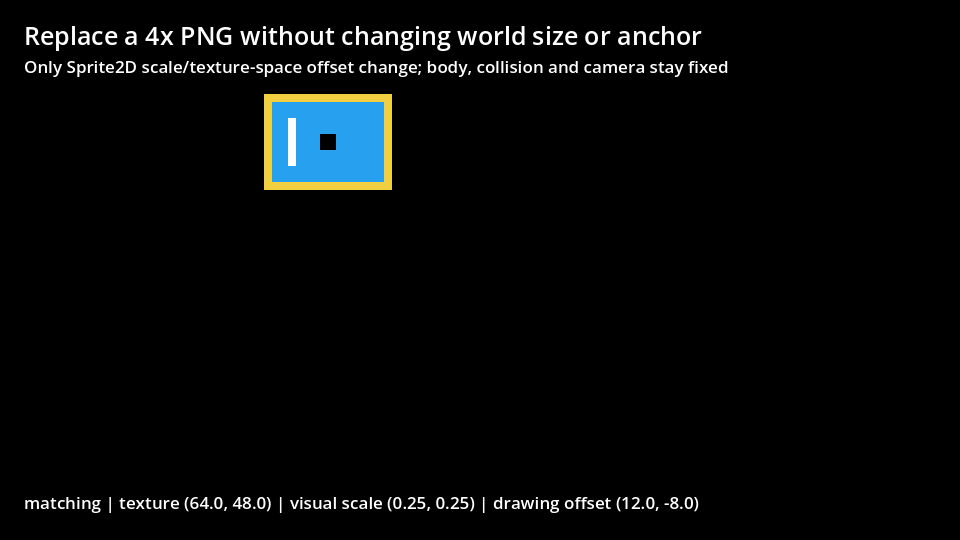
The scale-only artwork starts at screen (246,106). Across all four states, (91,84) still hits the intended actor and (100,84) still misses, with collision dimensions and body identity preserved.
For another asset, record its offset and transformed corners before replacement. This fixture does not test centered sprites, changed pivots, arbitrary parent transforms, trimmed animation frames or packed atlas metadata. It does not demonstrate Unity pixels-per-unit.