Start here
Use one AnimationPlayer with discrete value tracks for the sprite frame, lamp color and beam position. At an evaluated timeline position, check all three properties together.
The recorded 0.55-second pose shows frame 5, a green lamp and beam x=32. Disabling only the lamp track leaves the sprite and beam correct while the lamp stays black.
What you need
The original CC0 project contains a 64×32 numbered sheet, eight 16×16 cells, editable scenes, activation.tres and the checks. The extracted Godot project includes its PNGs and needs no Node or Python to run. Godot is separately licensed and not bundled.
Tested with: Godot 4.7.2.stable.official.ed1daf0bf, Compatibility, OpenGL 4.1 / Metal 91.7 on Apple M4. Retained native viewport captures and property observations; no manual editor-click or new execution claim.
1. Import and run the original scene
Extract the project and enter godot-workflow-reserves. Replace godot with your executable and choose a new absolute evidence directory:
godot --headless --editor --language en --path . --import
godot --path . --position 80,80 -- \
  --case=coordination --out=/absolute/evidence/coordination
The first command imports resources. The second uses the actual renderer, writes six viewport PNGs and observations.json, then exits. A successful headless import alone does not establish the rendered result.
2. Put three properties on the same timeline
Inspect coordination.tscn and the AnimationPlayer’s activate animation. Its separate scene nodes are Machine (Sprite2D), StatusLamp (Polygon2D), and Carrier/Beam (Polygon2D). The track paths in activation.tres are:
Machine:frame
StatusLamp:color
Carrier/Beam:position| Key time | Frame | Lamp | Beam x |
|---|---|---|---|
| 0.0 s | 0 | Black | 0 |
| 0.2 s | 2 | Amber | 16 |
| 0.5 s | 5 | Green | 32 |
| 0.8 s | 7 | Green | 48 |
All three use discrete updates. Change their key values together when adapting this machine action. The separate lamp and beam make this a scene-coordination task; an independent frame loop can use AnimatedSprite2D/SpriteFrames.
3. Evaluate and inspect a known pose
The case script evaluates four known positions: 0.0, 0.25, 0.55 and 0.85 seconds. For the third pose it uses:
player.stop()
player.play("activate")
player.advance(0.55)
player.pause()
Inspect frame 5, the green lamp and beam local x=32 together. The retained native capture inspection matched the sprite’s source cell at 8× and checked the separate lamp color and beam bounds. A sprite-only match would leave the scene tracks unchecked.
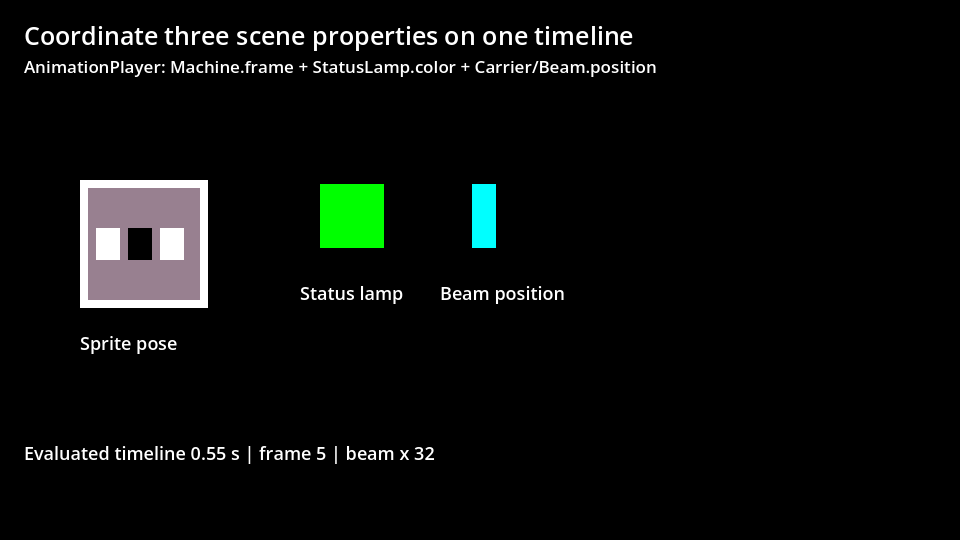
This explicitly evaluates a timeline position. It does not measure how quickly playback reached it.
4. Detect the disabled lamp track
The negative control disables only track 1, resets the lamp to black and evaluates 0.55 seconds again. The recorded result retains frame 5 and beam x=32, but the lamp remains black. Restore that track before the following playback check.
The script then performs an unforced one-shot run. Its retained state order is 0→2→5→7 with the corresponding lamp/beam tuples. Those elapsed observations are stored separately from the deterministic poses. Configured key times do not guarantee wall-clock FPS.
These results cover this original project and native renderer. They do not establish current editor menus, exported executables, other renderers or a production timing guarantee.